XML Product Feed Automation: Control Pricing, Stock and Catalog Updates
XML Product Feed Automation: Control Pricing, Stock and Catalog Updates
When a supplier changes a price, how many people, spreadsheets and systems stand between that change and your customer?
If the answer is more than one, your ecommerce operation may have a hidden automation problem.
The visible symptoms are familiar:
- Prices are updated late or with the wrong margin.
- Products appear under the wrong categories.
- Stock shown online does not match the supplier or warehouse.
- Variant names and brands are inconsistent.
- The same product work is repeated for every sales channel.
- A team member must constantly check whether an import worked.
These are not simply "data entry" problems. They affect margin, customer trust and the amount of business your existing team can manage.
ProWebify builds custom product feed and ecommerce operations workflows for this exact gap. You can see the service and delivery approach here.
In plain language: what does product feed automation do?
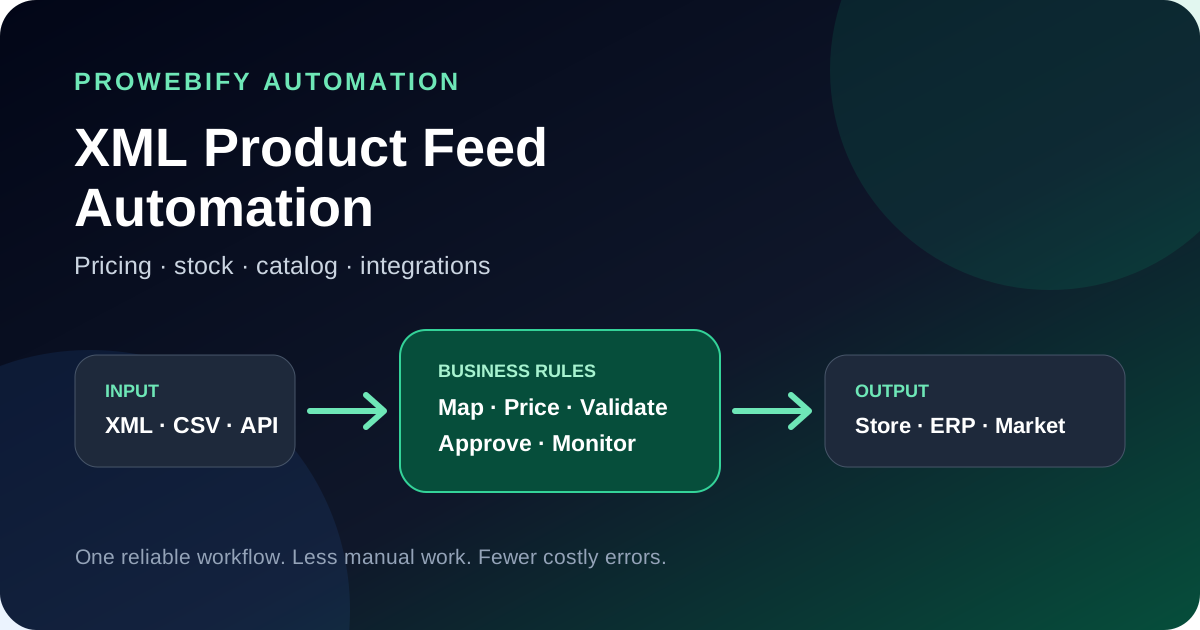
It takes product data from one or more sources, applies your business rules and sends clean, usable information to the systems where you sell or operate.
A simple flow looks like this:
- Read products from a supplier XML file, CSV export or API.
- Match the supplier fields to your own catalog structure.
- Calculate sales prices using currency, cost, tax and margin rules.
- Filter unavailable, incomplete or unwanted products.
- Update stock and product information in the target system.
- Record errors and alert your team when an exception needs attention.
The objective is not automation for its own sake. The objective is fewer mistakes, faster updates and better control.
When is a custom workflow worth considering?
A ready-made plugin may be enough when there is one supplier, one store and very simple rules. A custom workflow becomes more useful when the operation includes exceptions.
Common signals include:
- Several suppliers use different XML or CSV structures.
- Your prices depend on exchange rates, product groups or different margin levels.
- Some products need minimum stock or safety buffer rules.
- Categories, brands, colors or sizes need normalization.
- You sell through more than one store or marketplace.
- Your ERP, warehouse, CRM or internal system must stay synchronized.
- A failed import can create cancelled orders or incorrect prices.
- Your team has created a large spreadsheet to compensate for software limitations.
If the spreadsheet has become the real control panel of the business, it is usually time to evaluate a more reliable layer.
The four parts of a reliable integration
1. Data inputs
The system first needs a stable way to receive information. That may include:
- Supplier XML feeds
- CSV files
- JSON or REST APIs
- SFTP folders
- Database views
- ERP or PIM exports
- Webhooks for immediate events
Before development, access frequency, documentation, authentication and rate limits should be checked. An API name alone does not guarantee a good integration.
2. Mapping and validation
Two systems rarely describe a product in exactly the same way. Mapping translates the source into your commercial structure.
Typical mapping rules include:
- Supplier code to internal SKU
- Barcode and manufacturer part number
- Supplier categories to store categories
- Brand spelling and aliases
- Parent products and variants
- Color, size and other attributes
- Image selection and ordering
- Required field checks
- Duplicate detection
Validation should happen before bad data reaches a live sales channel.
3. Pricing and stock rules
This is where the integration becomes specific to the business.
A pricing engine may use:
- Supplier cost
- Current exchange rate
- Category or brand margin
- Tax rate
- Shipping or operational cost allowance
- Customer group
- Minimum price or profit protection
- Psychological or commercial rounding
- Campaign exclusions
Stock logic may include:
- A safety buffer so the last supplier units are not sold twice
- A minimum quantity before a product becomes available
- Different stock priorities for different warehouses
- Rules for backorder or made-to-order products
- A fallback when the supplier feed is temporarily unavailable
These decisions should be written as clear business rules before they become code.
4. Outputs, monitoring and control
The clean result may be sent to Shopify, WooCommerce, a marketplace, a custom ecommerce platform, an ERP or another internal system. The exact connection depends on available APIs and permissions.
A professional workflow should also answer:
- When did the last successful update run?
- How many products were added, changed, skipped or rejected?
- Which rule changed a price?
- What happens when an external service is unavailable?
- Can a critical price change require approval?
- Who receives an alert when the job fails?
Without logs and exception handling, automation can simply make mistakes faster.
A practical implementation checklist
Before asking for a quote, prepare the following:
Business information
- The repeated task that currently consumes the most time
- The commercial risk when an update is wrong or late
- The people who need to approve exceptions
- The result that would make the project successful
Source information
- A sample XML, CSV or API document
- Update frequency
- Authentication method
- Approximate number of products and variants
- Known data quality issues
Target information
- Store, marketplace, ERP, CRM or database name
- Available API documentation and credentials process
- Fields that may be updated
- Rate limits or platform restrictions
- Test or sandbox availability
Rule information
- Pricing formulas
- Tax and currency requirements
- Stock safety rules
- Category and brand mappings
- Products that must never be published automatically
- Approval and alert preferences
Even when this information is incomplete, a sample file and a short screen recording of the current work are enough to start a useful technical conversation.
Should the workflow be fully automatic?
Not always.
Low-risk catalog updates can often run automatically. High-impact changes may need safeguards.
For example:
- Reject a price when it changes by more than a defined percentage.
- Preview new category mappings before publishing.
- Require approval when a product falls below minimum margin.
- Stop publishing when the supplier feed looks incomplete.
- Alert a responsible person instead of silently continuing.
Good automation removes repetition without removing control.
What else can use the same approach?
The same integration thinking applies beyond product feeds:
- B2B quote generation and approval
- Customer-specific price lists
- Order transfer between a store and ERP
- Invoice or document processing
- Shipping label and tracking workflows
- Lead routing between forms and CRM
- Marketplace order consolidation
- Daily operational reports
- Internal approval panels
The best automation projects usually begin with one expensive, repeated bottleneck and expand after that workflow is stable.
How ProWebify approaches the project
We keep the first conversation practical.
- You send the current workflow, sample data or API documentation.
- We identify the real bottleneck and technical dependencies.
- We explain the proposed workflow in plain language.
- We define what will be delivered and how it will be verified.
- We build and test with realistic data.
- You review the agreed delivery.
Payment is collected after the agreed project delivery is completed and presented for review.
We also welcome integrations that are not listed on our site. If a service has a usable API, export or data access method, we can evaluate a custom connection.
Start with the problem, not a software name
You do not need to know whether the answer is XML, API, middleware, a scheduled job or a custom dashboard.
Tell us what your team repeats, where errors occur and which systems are involved. We will translate that into a clear automation scope.
Explore the product feed automation service or send the workflow on WhatsApp.
Recommended decision path
Move from reading to a clearer project route
These pages connect the article to the commercial next step: scope, budget, service fit or a first project conversation.
Need a clearer project scope before you move?
We can help you turn an unclear ecommerce or website brief into a commercially realistic delivery plan with fewer wasted steps.
Related English articles
Conversion Strategy
Why Website Redesign Projects Fail Before They Even Launch
Most redesigns do not fail because the new UI looks bad. They fail because the team rebuilds pages before fixing the commercial logic that made the old website weak in the first place.
Conversion Strategy
Landing Page Design Best Practices for B2B Lead Generation
A B2B landing page should not try to look clever first. It should reduce hesitation, explain fit quickly and move the right buyer toward a serious next step.
AI Search
How AI Search Is Changing Service Company Websites
AI-assisted search changes what a strong service website looks like. Pages now need to answer real buying questions more directly, not hide value behind vague agency language.